

Guides
How to Send a PDF as Physical Mail in Australia
Need to send a PDF as physical mail? Here’s how to turn your file into a PDF, what to check before sending, and how to get it posted in Australia.
“Wait — you can turn a PDF into physical mail?”
Yes. The category is genuinely new here — at least in the form built for individual senders, not enterprise bulk-mail outfits. You can upload a PDF from your phone or laptop and have it arrive at someone’s letterbox via Australia Post, without owning a printer or making a trip to the post office.
Everything is digital now — until someone needs the document on paper. A signed contract heading to a solicitor. A statutory declaration for a government office. Correspondence with someone who doesn’t email. The PDF is sitting on your screen; it needs to be in their letterbox.
Here’s how to get from one to the other in Australia — starting with the part most people get stuck on: turning your file into a PDF in the first place, if it isn’t one already.
Turning Your Document into a PDF First
Not everyone starts with a PDF. A Word document, a Google Doc, a photo of a signed form on your phone, a paper original that needs to be scanned — these are all common starting points. Getting any of them into PDF format is usually a one- or two-click job, but only if you know where to look. The hard bit of sending a PDF as physical mail isn’t usually the posting — it’s getting the file into PDF format in the first place.
From Microsoft Word
Word is the most common starting point, and native Word-to-PDF export preserves formatting, fonts, page breaks, and embedded images reliably. No third-party tool needed.
- Word desktop (Windows): File → Save As → choose PDF in the file format dropdown. Or File → Export → Create PDF/XPS Document.
- Word desktop (Mac): File → Save As → File Format: PDF.
- Word Online (web browser): File → Download → PDF Document (.pdf).
- Word mobile (iOS or Android): Share button → Send a Copy → PDF.
From Google Docs
Google Docs exports to PDF in whatever page size the document is currently set to. If your exported PDF looks off — margins wrong, content cut off — check the page setup. A4 is standard for Australian documents; US Letter is the default for US-originated docs and renders slightly differently.
- Web browser: File → Download → PDF Document (.pdf).
- Mobile app: Tap the ⋮ overflow menu → Share & export → Save as → PDF.
From Apple Pages
Pages is the default word processor on Mac and iOS devices.
- Mac: File → Export To → PDF.
- iPhone or iPad: Tap the ⋯ menu → Export → PDF.
From a Photo or Image
This is the one a lot of Australian senders get stuck on — a signed form photographed on a phone, a screenshot saved as an image, a quick capture of a paper document. The good news: every modern phone can convert an image to a PDF natively, no app download required.

- iPhone (hidden gesture method): Open the photo in the Photos app → Share → Print. In the print preview, pinch outward with two fingers on the page preview. This opens a full-screen PDF version of the image. From there: Share → Save to Files. This long-standing iOS shortcut is buried but works on every iPhone.
- iPhone (alternative method): Photos → Share → Save to Files. Then in the Files app, long-press the saved image and choose Create PDF.
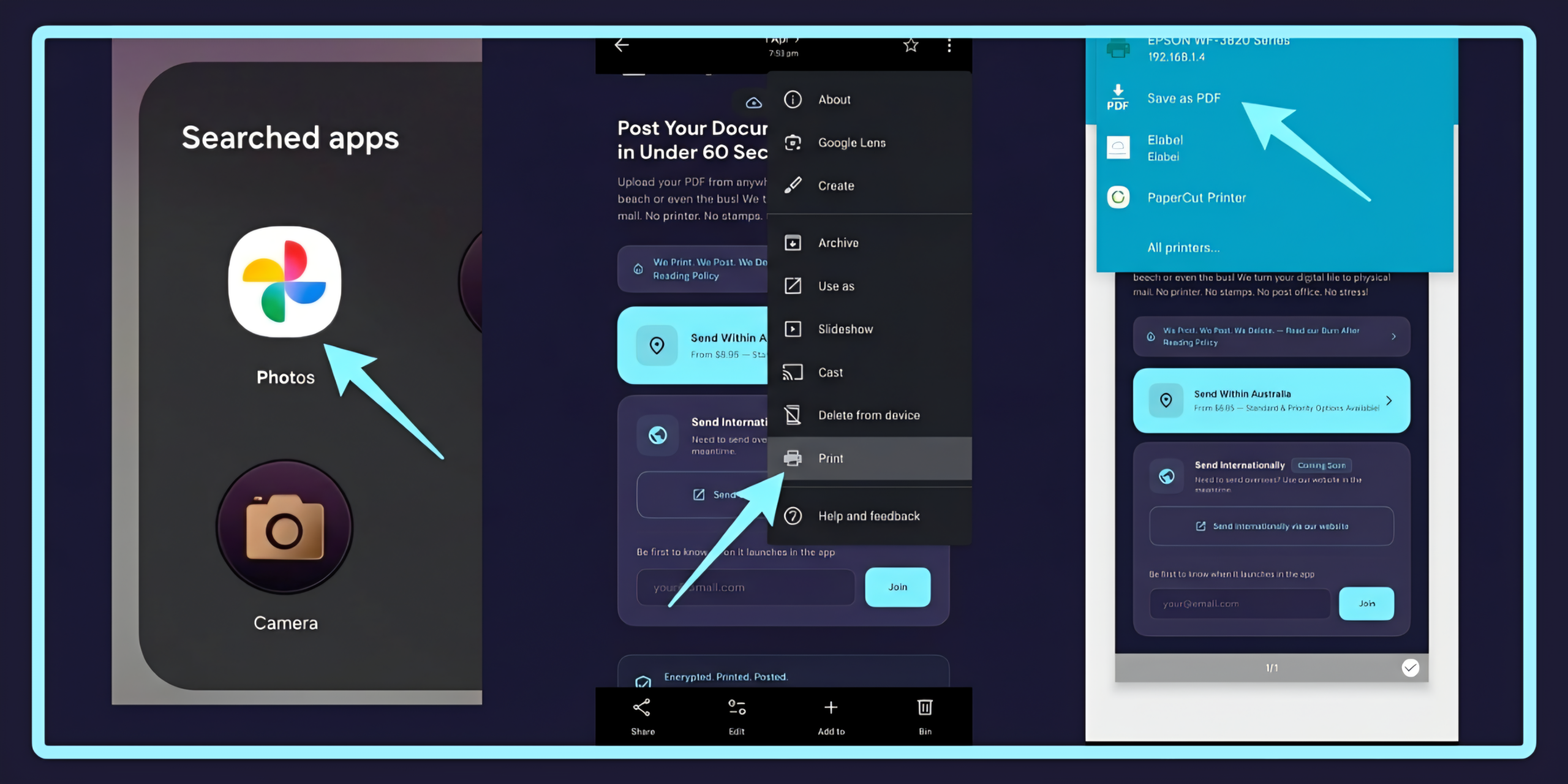
- Android: Open the photo in Google Photos → tap the three-dot menu (top right) → Print → in the printer dropdown, choose “Save as PDF.” Saves to Downloads or Drive depending on your setup. (You can also reach Print via the Share button if you prefer that path.)
From a Paper Document (Scan to PDF)
For physical documents — signed contracts, paper forms, receipts, anything that exists only on paper. Every modern phone can scan paper documents to PDF without a dedicated scanner.
- iPhone Notes app (built-in, no download): Open the Notes app → start a new note → tap the camera icon → Scan Documents. Align each page in the viewfinder, capture, then tap Save when done. Outputs as a PDF you can share or save to Files.
- Google Drive (mobile, Android or iOS): Tap the + button → Scan → align and capture each page → Save. Saves directly to your Drive as a PDF.
- Purpose-built apps: Adobe Scan, Microsoft Lens, CamScanner. All have free tiers. These handle multi-page documents and image enhancement more capably than the built-in tools, particularly useful if you’re scanning the same kind of document regularly.
For any paper document — handwritten or typed, signed form, printed letter, contract, or receipt — our guide to turning a paper document into a PDF goes deeper on framing, lighting, and scan quality.
From an Email or Web Page (Print to PDF)
Sometimes the document isn’t a document at all — it’s an email exchange you need to post as a record, or a web page (an order confirmation, a council notice, a government portal screen) you need to send as physical mail. The trick is using your operating system’s Print function, then choosing “Save as PDF” as the printer instead of an actual printer.
- Mac (any browser, Mail app, or application with a Print menu): File → Print → in the bottom-left of the print dialog, click the PDF dropdown → Save as PDF.
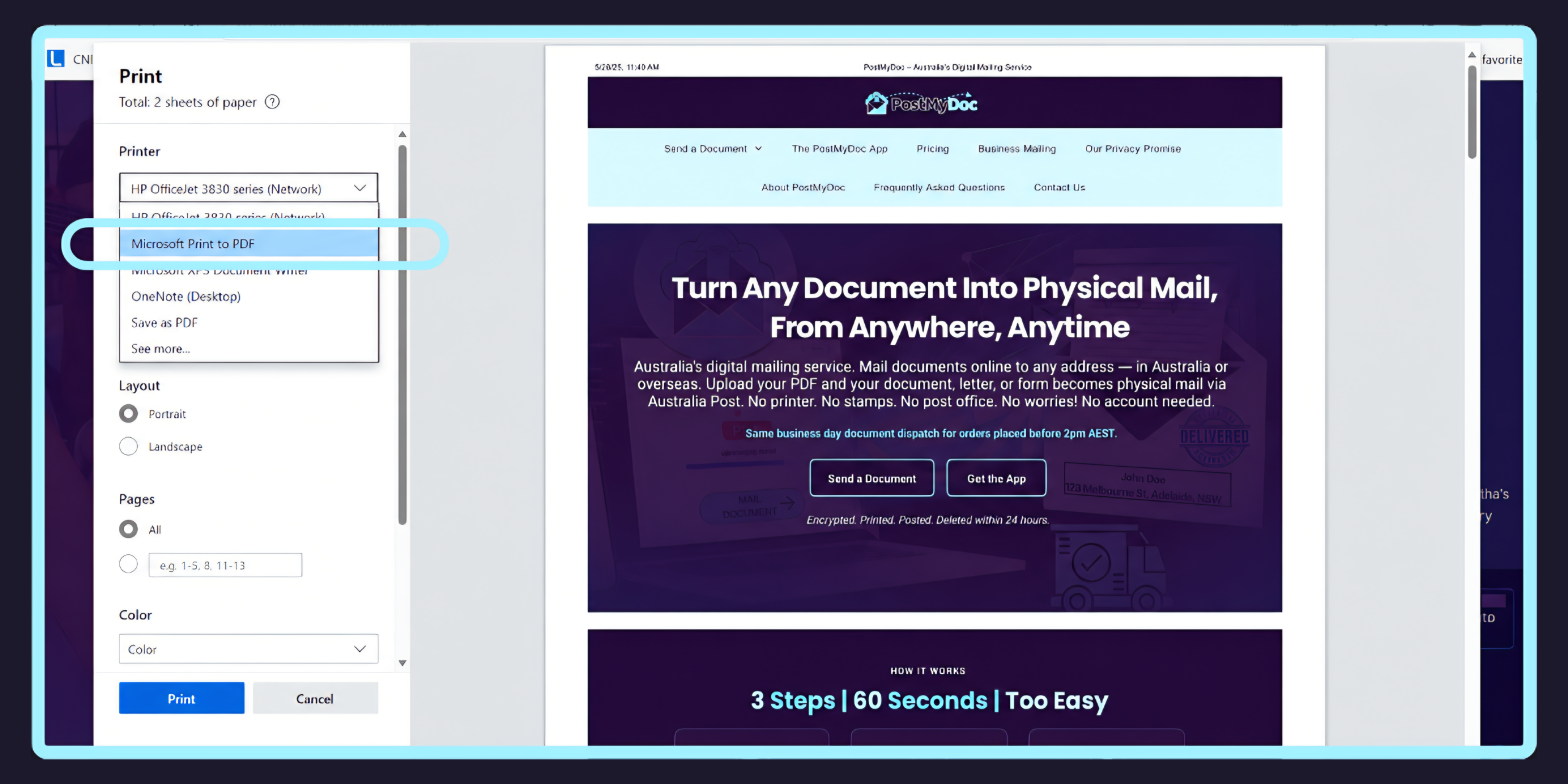
- Windows 10 or 11 (any app with Print): File → Print → choose “Microsoft Print to PDF” as the printer → Print → choose where to save.
- Chrome / Edge / Firefox (any operating system): Press Ctrl+P (Windows) or Cmd+P (Mac) → in the Destination dropdown, choose “Save as PDF” → Save.
- iPhone (Safari or Mail): Tap the Share icon → Print → in the print preview, pinch outward with two fingers on the page (the same iOS gesture as for photos) → Share → Save to Files.
- Android (Chrome or Gmail): Tap the ⋮ menu → Print → in the printer dropdown, choose “Save as PDF” → Download.
A few things worth knowing about Print to PDF output. Emails save with the full header and timestamps intact — useful when the date and sender are part of why you’re posting it. Web pages save with whatever’s currently rendered on screen, which means cookie banners, ads, and pop-ups will be captured if you don’t dismiss them first. For long web pages or email threads, check the page preview before saving — the print version may break across pages in odd places, and you might want to adjust the print settings (margins, scale, headers/footers) for a cleaner result.
Merging Multiple Files into One PDF
When the document spans multiple files — a cover letter plus supporting docs, a lease plus an addendum, a contract plus signed annexes — they need to be combined into a single PDF before posting.
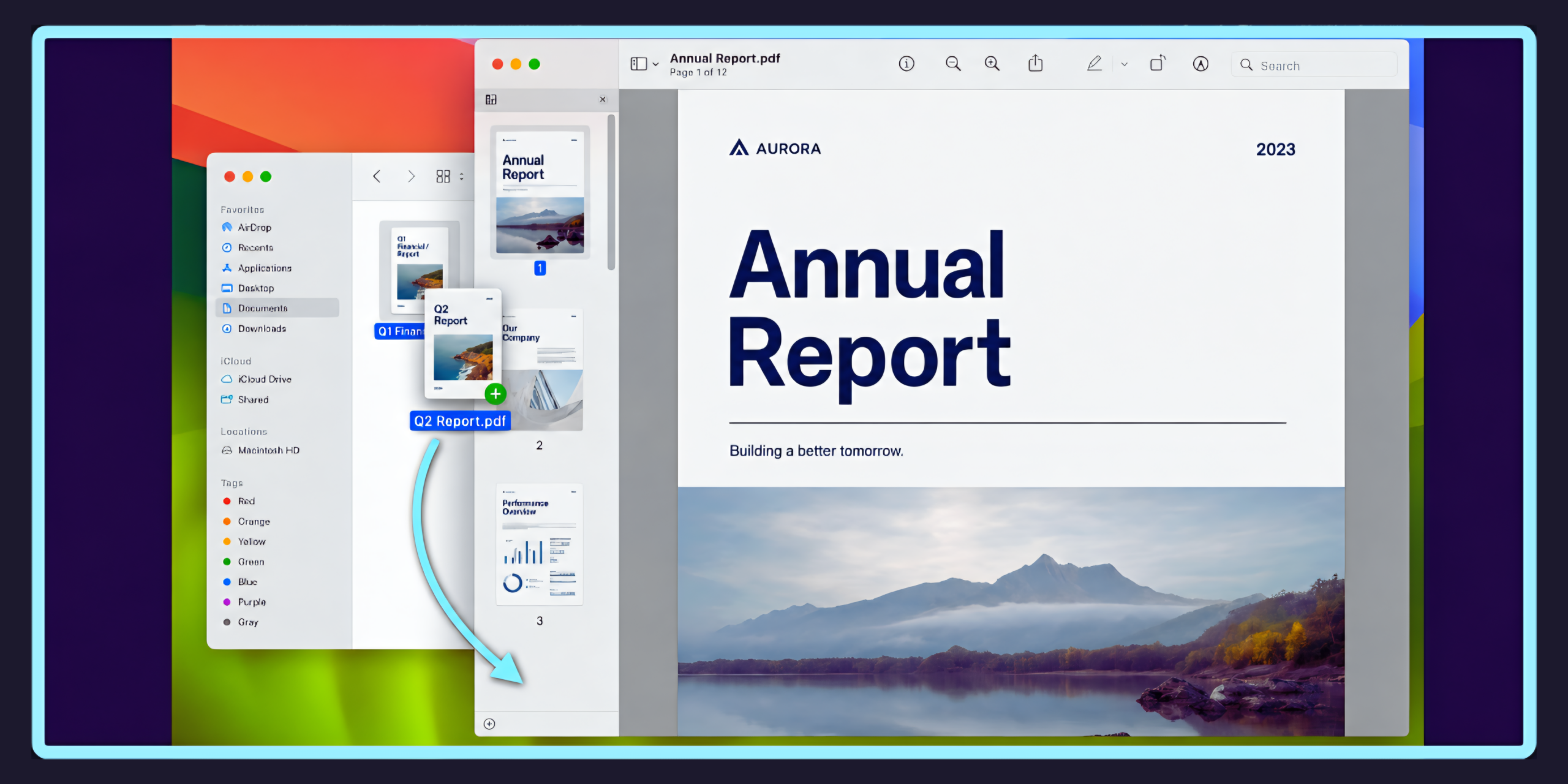
- Mac Preview (built-in, no download): Open the first PDF in Preview → View → Thumbnails → drag your additional PDF files into the thumbnail panel in the order you want them → File → Export as PDF.
- Online tools (in-browser, free): Smallpdf, ILovePDF, and Adobe Acrobat online all offer free PDF merging directly in your browser. No account required for basic merging. Upload your files, drag them into the order you want, click merge, download the combined PDF.
For the deeper question of why PDF specifically — rather than Word or another format — is the right choice for posting, we’ve covered that here.
Once you’ve got your PDF ready, the question is how to actually get it printed and posted. Here’s what the landscape looks like in Australia.
What’s Actually Available in Australia
When you need to send a PDF as physical mail, there are three real paths. They differ on cost, effort, and what you’re actually paying for.
Do it yourself. Print the PDF, fold it into an envelope, stick on the right number of stamps, and drop it in a red Australia Post post box. If you’ve already got a printer, ink, envelopes, and stamps, this is the cheapest option. A small letter is $1.70; larger or heavier letters scale up from there — we’ve covered the full cost breakdown here. If you’re missing any of those — particularly the printer — the calculation shifts. Here’s what your options look like without a printer, and here’s how to avoid the trip to the post office if that’s the bit you’d rather skip.
Use an online print-and-post service. Upload your PDF, enter the recipient’s address, pay, and the service handles the printing, enveloping, and lodging with Australia Post on your behalf. No printer, no envelope, no trip.
If you Google this, most of the results will be US-based — Mailform, Letter Pilot, DocuPost, Thatch. They work fine for posting within the United States, but none of them use Australia Post and none are set up for Australian addresses, postage rates, or delivery timeframes. They’re not options for sending a letter within Australia.
In Australia specifically, the options are limited. ClickSend offers an online post service alongside their core business — bulk SMS, MMS, and messaging for businesses. The postal service works, but it’s one feature within a larger communications platform built for business volume. You’ll need to create an account and start a free trial before you can send anything.
PostMyDoc is purpose-built for this — turning a PDF into physical mail via Australia Post. No account required, no trial, no subscription. Upload your PDF on the website or through the mobile app, enter the address, choose your print and postage options, pay, and it’s sorted. Pricing starts from $8.95 for up to 10 B&W pages with Standard Post postage included. Documents are encrypted in transit, printed once, and permanently deleted within 24 hours of dispatch under the Burn After Reading Policy — the part that matters if you’d rather not have the file sitting on a third-party server indefinitely.
Both ClickSend and PostMyDoc handle the print-and-post pipeline through Australia Post. The difference is what each one is built for — a business messaging platform with a postal add-on, versus a service that exists solely to get your document to the post.
When a PDF Actually Needs to Be Posted
Most of the time, email does the job. But there are situations in Australia where physical delivery is either legally required or practically the only path.
Legal and regulatory requirements. A statutory declaration needs to be printed, signed, and often posted to the relevant authority. Some court documents must be served in hard copy. Formal notices — like a notice to vacate under tenancy law, or a breach notice under a contract — may need to be posted to be considered properly served. Plenty of government departments still require physical submissions, particularly for original signed documents or certified copies.
Formal correspondence where email won’t cut it. Demand letters carry more weight when they arrive on paper. A printed letter to a landlord, insurer, or employer signals seriousness in a way an email doesn’t — rightly or wrongly, a physical letter says I’m not mucking around. Employment correspondence — termination letters, formal warnings, redundancy notices — is often posted as standard HR practice. Some workplace law actually requires certain notices to be sent by mail.
People who don’t use email. It’s one of the most common reasons people post documents. An elderly relative. A neighbour in a body corporate dispute. A rural landholder. A government department that only accepts physical submissions for a particular form. Not everyone is online, and not everything can be handled digitally.
International documents. If you need to send a signed document overseas — or send something to an Australian address from overseas — physical mail might be the only option when digital signatures aren’t accepted or originals are required. Immigration paperwork, international legal matters, and inter-government correspondence still rely on physical post regularly. We’ve covered international sending separately.
Documents where what you sent is what counts. This is the underrated reason. A PDF emailed to someone can be edited by the recipient before being forwarded — a figure changed, a date altered, wording modified, with no visible trace. A printed and posted document can’t be quietly altered in the same way. For anything where the integrity of what you sent matters, physical post is structurally more reliable than email.
What to Check Before You Send Your PDF
Not all PDFs print well. A few things are worth checking before you send — whether you’re printing yourself or uploading to a service.
Is your PDF formatted for A4? Most Australian documents are A4 (210mm × 297mm). If your PDF was created for US Letter size (slightly different dimensions), it’ll still print fine — you’ll just see slightly different margins. But if it’s a non-standard size like A3, A5, or a custom format, it may not come out as expected without resizing. Check the page setup first.
Is it a native PDF or a scanned image? A native PDF — created from Word, Google Docs, or any document software — prints cleanly at full resolution. A scanned PDF is essentially a photo of a document. If the scan is ordinary (blurry, skewed, faded), the printed version will look exactly the same. Quick test: zoom in to 100% on screen. If it looks sharp, you’re fine. If it’s fuzzy on screen, it’ll be fuzzy on paper.
Is it password-protected or encrypted? Some PDFs have permission restrictions — viewable but not printable. Others need a password to open at all. If you’re printing yourself, sort out the print restrictions first. If you’re using an online service, the file needs to be uploadable and printable without a password. No decent service should be bypassing your document security for you.
Colour or black and white? This affects both quality and cost. If your document is straight text — a letter, a contract, a stat dec — black and white does the job and costs less. If it includes logos, charts, photos, colour-coded tables, or anything where colour carries meaning (annotated photos in a property inspection report, colour-marked diagrams), colour preserves that. The test: does anything important disappear if this prints in greyscale? If yes, go colour. Pricing for each option is here.
How many pages? Page count affects postage. A single-page letter slips into a standard envelope no worries. A 50-page document is a different beast — heavier, thicker, potentially needing a larger envelope or a different postage category. If you’re posting it yourself, the weight and envelope size determine the rate. With a service like PostMyDoc, page count is factored into the pricing automatically — the first 10 pages are included in the base price, with extra pages at $0.20 (B&W) or $0.45 (colour) each.
Does it need tracking or proof of delivery? Standard Post is fine for everyday correspondence. But if your document is legal, financial, or time-sensitive, you’ll probably want to know it actually arrived. Registered Post adds proof of posting and can include signature on delivery, but it has to be lodged at a post office counter. If you’d rather avoid the trip, Standard Post with Tracking and Express Post options are available through online services without setting foot in a post office. For genuinely sensitive documents, the security question goes beyond tracking — what happens to your file at the sending service often matters more than how the envelope travels.
Common PDFs People Send as Physical Mail
Not sure if your document is the type of thing people post? Here are the categories that come up most often.
Legal. Statutory declarations, affidavits, court documents, formal notices, cease and desist letters, demand letters, power of attorney documents, wills and estate documents.
Property. Lease agreements, notice to vacate, bond claims, body corporate correspondence, property inspection reports, settlement documents.
Government. Tax returns and supporting documents, Centrelink forms, immigration paperwork, council submissions, freedom of information requests.
Business. Contracts and agreements, invoices requiring physical delivery, employment letters, termination and redundancy notices, formal complaints, insurance claims.
Personal. Letters to family, correspondence with people who don’t use email, cards with enclosed documents, responses to received mail.
If it’s a PDF and the recipient needs it on paper, it can be posted.
From File to Letterbox
The end-to-end journey is: file → PDF → posted. The first arrow is where most people get stuck, which is why this post spent most of its time there. Once you’ve got a PDF, the rest is either a trip to the post box or a service that handles the posting for you.
If you’ve already got a printer, envelopes, and stamps, and you don’t mind the trip, doing it yourself is the cheapest option. For most other situations — no printer, no time, a document that’s not yet a PDF — an online service costs more but does the work.